of passengers triggered alarms because of poor preparation.
Average in a 60-hour walk-through metal detector lane study; random alarms excluded.
Kierzkowski et al. · 2026 Applied intelligence. PortalLet’s talk
AIVA helps passengers prepare for security, find answers and access airport services. Guidance is available in more than 100 languages.
Passenger research and industry studies.
of passengers triggered alarms because of poor preparation.
Average in a 60-hour walk-through metal detector lane study; random alarms excluded.
Kierzkowski et al. · 2026want to reach their gate in under 30 minutes.
Hand luggage only; whole airport journey, excluding shopping and dining.
IATA passenger survey · 2025named fast screening as their most satisfying aspect.
Passengers surveyed across eight UK airports in 2025.
Department for Transport · 2025 survey
Inside the divest portal
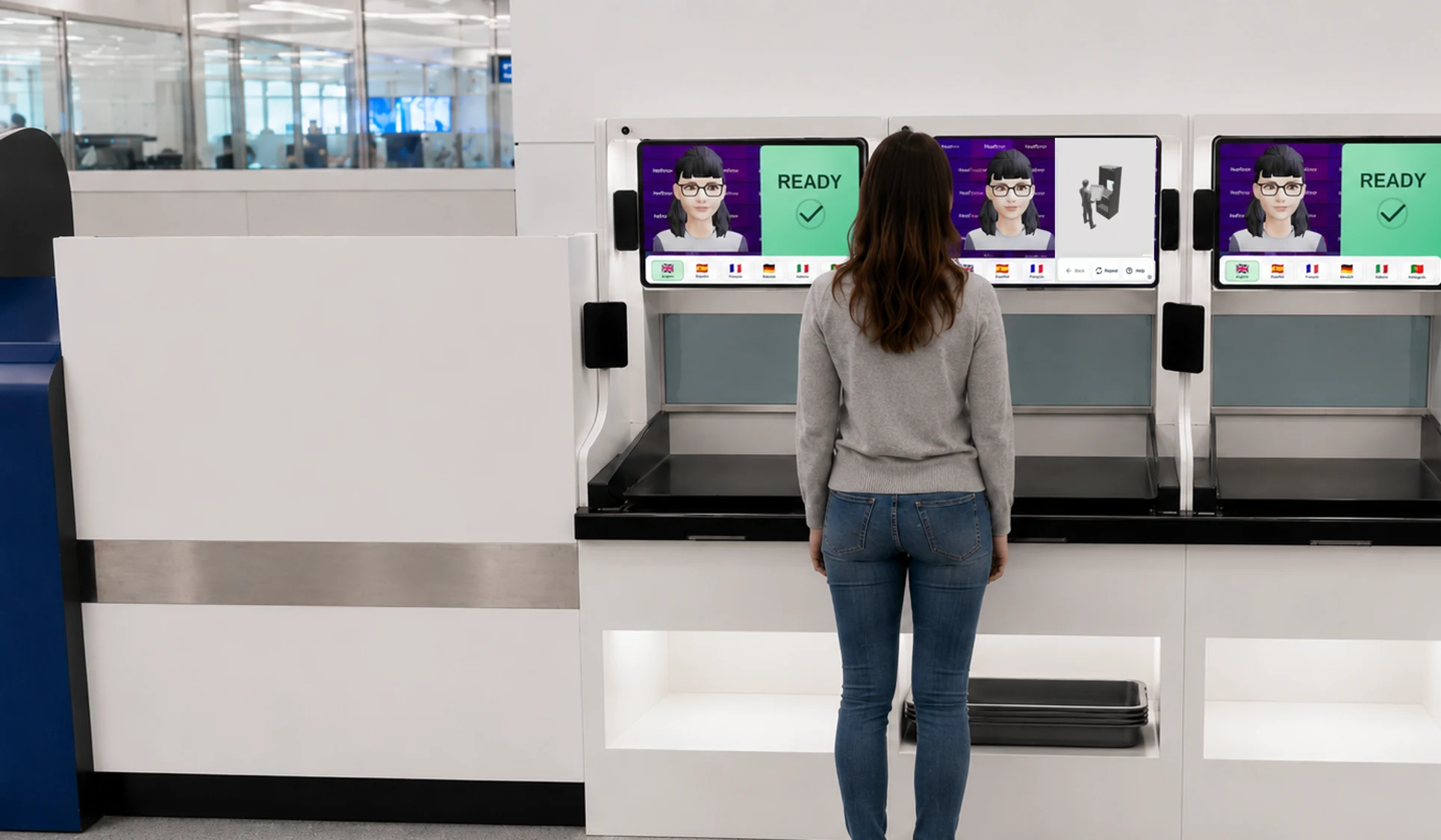
Observes current tray loading and visible items still to be divested, so AIVA can recommend what to do next.
Ask questions by voice or touch and get answers in real time. Choose a language on screen or let AIVA detect it from speech.
Screen behaviour and carried items before and during divestment using integrated technology.
Rise or lower to open, swing, or pin gates.
Help at the divest point
Understand passenger preparation and tray loading to identify what needs attention.
Give clear next-step guidance based on the tray configuration and items still to be divested, using the optimal preparation order learned for different scenarios.
Confirm that preparation and tray loading meet the checkpoint’s requirements.
Optional control mode holds unsuitable trays and releases approved trays in readiness order to improve lane flow. Movement respects passing trays, clear rollers and the lane’s safety controls.
Fits your checkpoint
Place the kiosk beside an existing lane or mount it on top of existing divest tables. Observation cameras and an integrated RFID reader support checks; guidance uses your airport’s instructions and supported lane controls.
Conversational AI / Toward operational superintelligence
The freestanding kiosk helps passengers prepare while they wait. Around the terminal, it connects them with the answers, places and services they need.
AIVA answers in their language.
Gates, shops, toilets and accessible routes.
Connect with onward transport.
Find and reserve a place to relax.
Pay for connected bookings and purchases.
Airport documents, maps and service connections supply answers, directions, bookings and payments. Optional logistics connections can coordinate where and when belongings are collected.

“Does my laptop stay in my bag?” “Where do I go next?” AIVA uses your airport’s documents and FAQs to answer through voice, on-screen visualisations and touch interactions, give directions and request staff help when needed.
Try a passenger question
What should I get ready before I reach the tray?
Put your loose belongings in your bag, including everything from your pockets. Keep your bag ready for the tray. I’ll explain anything this checkpoint requires you to remove separately.
Does my laptop need to come out of my bag?
Removal rules depend on the equipment at your lane. I’ll use this checkpoint’s instructions to guide you.
¿Puedes explicarlo en español?
Guarda los objetos sueltos en tu bolso, incluido todo lo que lleves en los bolsillos. Te indicaré qué debes sacar por separado en este control de seguridad.
Choose the guidance and connections that fit your airport.
AIVA generates and adapts instructions in real time to passenger preparation, the current tray configuration and items still to be divested. Your airport’s approved procedures, equipment requirements, documents and FAQs provide the operating context.
Passengers can select a language on screen or let AIVA detect it automatically from their speech. They can use voice or touch, change language during the session, repeat instructions or request staff help. Spoken guidance, captions and visual instructions support different needs, including accessible directions around the terminal.
AIVA can be positioned beside an existing lane or mounted on top of existing divest tables. The divest portal contains built-in observation cameras and an integrated RFID reader. Gate options include rising or lowering vertical gates, swing gates and pin gates, selected to suit the lane and its safety controls.
In advisory mode, AIVA guides preparation while staff and existing lane controls manage movement. Optional control mode checks corrections and changes after approval, holds unsuitable trays and coordinates approved trays in readiness order across bays to improve lane flow. Movement respects controller permissions, clear transfer space and the lane’s safety controls.
AIVA can offer directions, accessible routes and airport information. Approved retail offers, bookings and payments can be connected through airport services, with optional payment terminals, readers or other interfaces selected for the installation.
Screening starts before divestment, using cutting-edge integrated technology.
An optional logistics interface can obtain, store, share or determine a collection destination and time for article carriers, such as trays, or selected items. Destinations can be fixed, chosen by passengers or operators, supplied by connected systems, recommended or selected automatically, or agreed through a combination of these arrangements. Rules, scheduling, optimisation or machine learning can weigh passenger preference, accessibility, onward route, available time, congestion, collection capacity, transport availability, security status and expected delivery or collection times to identify a suitable destination.
Choices can be made before, during or after screening, changed en route or reassigned after initial arrival. Different carriers or items in one session can have different destinations or collection times. Belongings may be retained, stored or moved by staff, carts, conveyors or automated transport to authorised reclaim points, lockers, staffed collection points, departure gates or other handover locations.
Linked custody events can record carrier or destination changes. Route availability, security holds, missed collection, cancellation and recipient verification can govern routing and handover, with passenger confirmation optional. Connected systems may select destinations or operate transport hardware; these arrangements are independent of any particular scan-record linkage.