Cloud analysis
Send scans to cloud-hosted analysis and reference data.
Cabinet Cloud Review Applied intelligence. PortalLet’s talk
One platform. Four perspectives.
See inside. Build intelligence.
Create data. Verify devices.
From CT and X-ray viewing to model development, data generation and automated device inspection. Choose the tools for your workflow.
CT and X-ray workspace
01 / Explore what is inside
Inspect CT volumes and X-ray images directly in your browser. Fast rendering and detailed views help your team see what is inside and review areas that need attention.
Open CT volumes or X-ray images in a browser-based workspace.
Explore layers in CT volumes or examine details in X-ray images.
Examine the details that matter to your inspection.
annotation workflow
02 / Build your intelligence
Turn your CT and X-ray data into a model-building workflow. Label objects, train your own models and test their performance against the scenarios that matter to your operation.
Annotate CT volumes and X-ray images with the objects and categories you need.
Use the labelled data to train models for your application.
Evaluate model results on separate test data before deployment.
object insertion workflow
03 / Multiply the possibilities
Insert synthetic and real scanned objects into CT and X-ray bag scans. Automatically create varied datasets for training and testing, expanding the scenarios your models can learn from.
Choose CT or X-ray bag scans and compatible synthetic or real scanned objects.
Insert objects into the scans to create varied bag contents.
Automatically produce datasets at scale for training and testing.

Device inspection
04 / Verify what is inside
A dedicated inspection cabinet for electronic-device verification. Compare internal components with trusted references to identify tampered or counterfeit electronics and highlight unexpected differences for review.
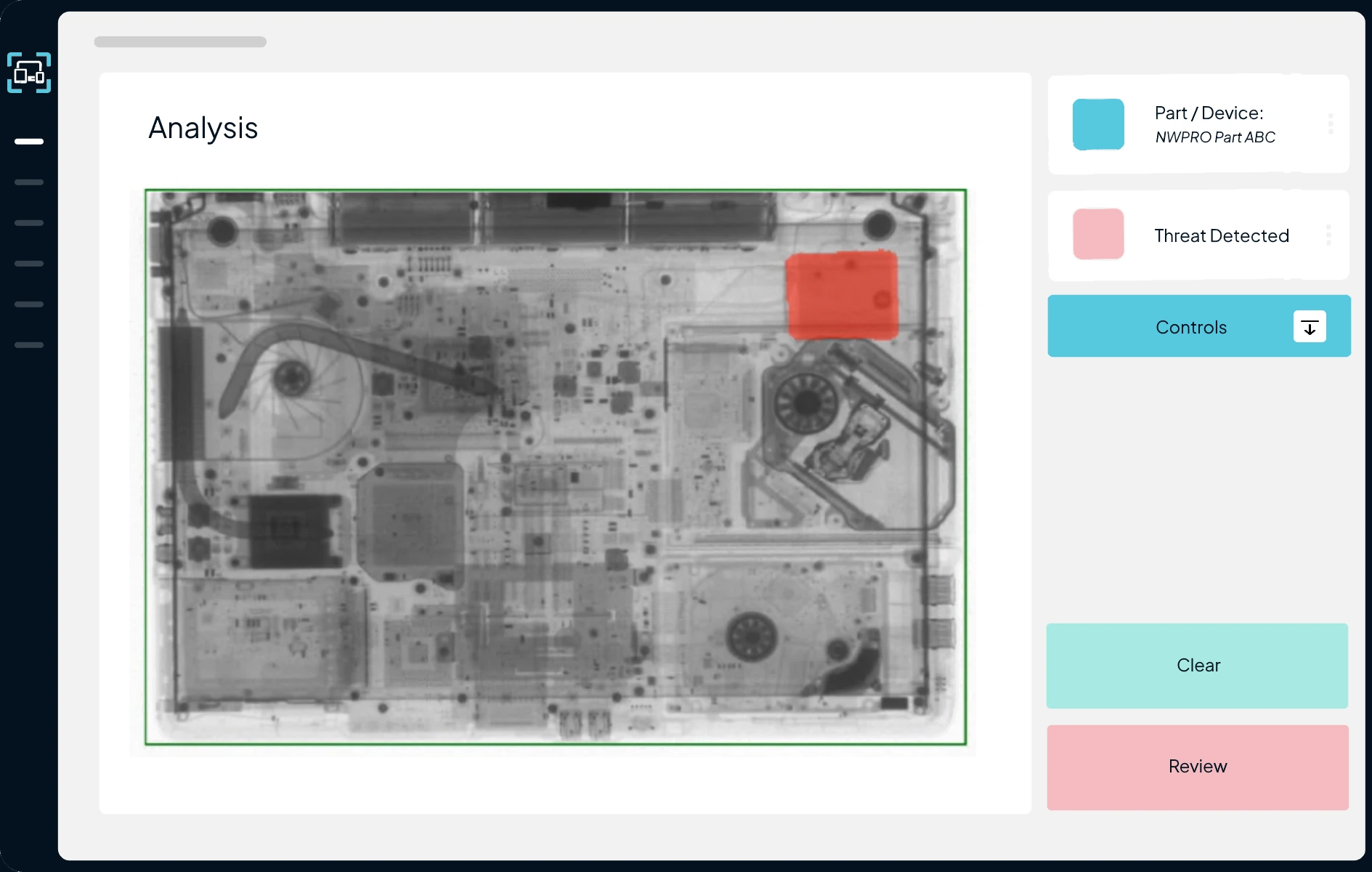
Analysis interface
Inspect the device’s X-ray, locate a highlighted area and use the Clear or Review controls to decide the next step.
Look beyond the casing
Identify additional, modified or missing components against the device’s expected configuration.
Tampered
An extra integrated circuit is present compared with the trusted reference, highlighting a possible tampered configuration for review.
Counterfeit configuration
The inspected device has additional chips, modified components and a missing memory component compared with its trusted reference.
The inspection workflow
Place the item inside and close the cabinet.
Scan and transfer to cloud or local analysis.
Identify the device or a suitable similar match.
Identify additional, modified or missing components against trusted reference data.
Highlight differences that need a closer look.
Alert an operator or send to a review centre.
Analysis where you need it
Send scans to cloud-hosted analysis and reference data.
Cabinet Cloud ReviewRun analysis with a self-hosted reference database.
Cabinet Local server ReviewAdditional inspection capability
Alongside electronic-device integrity checks, NDT can highlight unexpected internal material for investigation, including possible concealment of explosives or narcotics.
Choose the inspection arrangement for the substances, devices and workflow you need to assess.
Built around your workflow
Viewing, model development, data generation or device verification. Let’s discuss how Deeper Scan fits your operation.
Talk to our team